效果如下
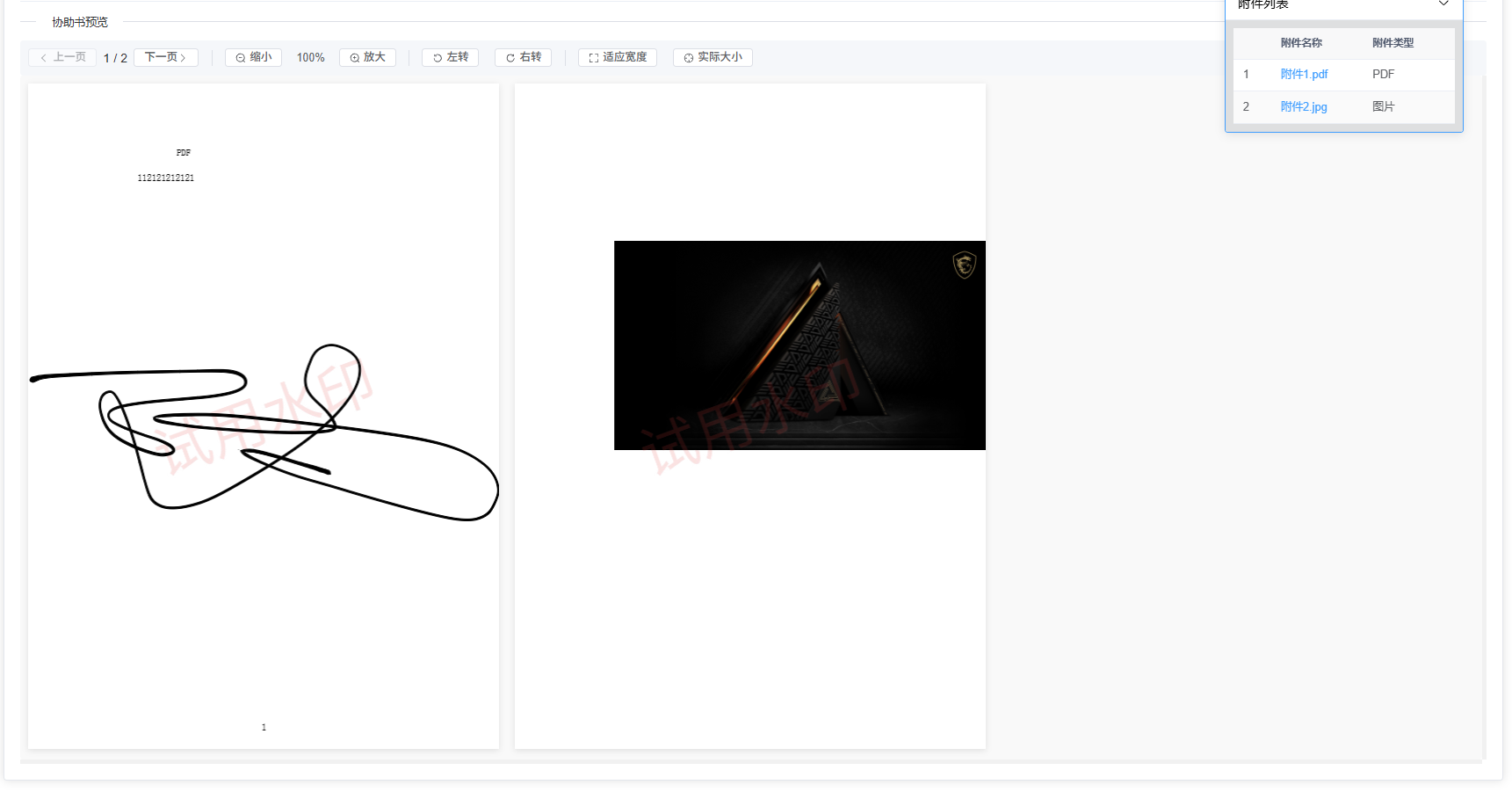
简单示例
<template>
    <PdfViewer :pdfUrl="demoPdf" />
</temlate>

import demoPdf from "@/assets/demo.pdf";
实现代码
1 . 安装pdfjs-dist
npm i pdfjs-dist
2 . 代码如下
<template>
  <div class="pdf-viewer-container">
    <!-- 工具栏 -->
    <div class="pdf-toolbar">
      <el-button size="small" icon="ArrowLeft" @click="prevPage" :disabled="currentPage === 1" class="pdf-btn">上一页</el-button>

      <div class="page-info">
        <span> {{ currentPage }} / {{ pdfPages }}</span>
      </div>

      <el-button size="small" @click="nextPage" :disabled="currentPage === pdfPages" class="pdf-btn">下一页 <el-icon><ArrowRight/></el-icon></el-button>

      <div class="divider"></div>

      <el-button size="small" icon="ZoomOut" @click="zoomOut" :disabled="pdfScale <= 0.5" class="pdf-btn">缩小</el-button>

      <span class="scale-text">{{ Math.round(pdfScale * 100) }}%</span>

      <el-button size="small" @click="zoomIn" icon="ZoomIn" :disabled="pdfScale >= 3" class="pdf-btn">放大</el-button>

      <div class="divider"></div>

      <el-button size="small" icon="RefreshLeft" @click="rotateLeft" class="pdf-btn">左转</el-button>

      <el-button size="small" icon="RefreshRight" @click="rotateRight" class="pdf-btn">右转</el-button>

      <div class="divider"></div>

      <el-button size="small" icon="FullScreen" @click="fitToWidth" class="pdf-btn">适应宽度</el-button>

      <el-button size="small" icon="Aim" @click="actualSize" class="pdf-btn">实际大小</el-button>
    </div>

    <div class="pdf-content">
      <!-- 加载状态 -->
      <div v-if="loading" class="pdf-loading">
        <div class="spinner"></div>
        <p>正在加载 PDF 文件...</p>
      </div>

      <!-- 错误提示 -->
      <div v-else-if="error" class="pdf-error">
        <p class="error-message">{{ error }}</p>
      </div>

      <!-- PDF 内容区 -->
      <div v-else class="pdf-container" id="videoContainer">
        <canvas
          v-for="pageIndex in pdfPages"

          :id="`pdf-canvas-` + pdfUrl + pageIndex"
          :key="pageIndex+pdfUrl"
          style="display: inline-block;margin:10px;align-items: center;justify-content: flex-start;width: 33%;"
        ></canvas>
      </div>
    </div>
  </div>
</template>

<script setup>
import { ref, reactive, onMounted, nextTick } from "vue";
import * as pdfjsLib from "pdfjs-dist/build/pdf";
import "pdfjs-dist/web/pdf_viewer.css";

const { pdfUrl } = defineProps({
  pdfUrl: {
    type: String,
    default: '', // 默认加载的PDF文件
  },
});

let pdfDoc = reactive({}); // 保存加载的pdf文件流
let pdfPages = ref(0); // pdf文件的页数
let pdfScale = ref(1.0); // 缩放比例

// 新增状态变量
let currentPage = ref(1); // 当前页码
let loading = ref(true);  // 加载状态
let shouldScroll = ref(false)
let error = ref(null);    // 错误信息
let rotation = ref(0);    // 旋转角度 (0, 90, 180, 270)
let containerWidth = ref(0); // 容器宽度

// 调用loadFile方法
onMounted(() => {
  console.log("PDF URL:", pdfUrl);
  if (!pdfUrl) {
    console.error("PDF URL is not provided.");
    error.value = "PDF URL is not provided.";
    loading.value = false;
    return;
  }
  nextTick(() => {
    loadFile(pdfUrl);
  })

  // 监听窗口大小变化,用于自适应
  window.addEventListener('resize', handleResize);
});

// 获取pdf文档流与pdf文件的页数
const loadFile = async (url) => {
  loading.value = true;
  error.value = null;

  try {
    pdfjsLib.GlobalWorkerOptions.workerSrc =
      "/node_modules/pdfjs-dist/build/pdf.worker.min.mjs";

    const loadingTask = pdfjsLib.getDocument(url);

    // 监听加载进度
    loadingTask.onProgress = (progressData) => {
      // console.log(`Loading PDF: ${Math.round((progressData.loaded / progressData.total) * 100)}%`);
    };

    loadingTask.promise.then((pdf) => {
      pdfDoc = pdf;
      pdfPages.value = pdf.numPages;
      nextTick(() => {
        // 测量容器宽度用于自适应
        containerWidth.value = document.getElementById('videoContainer')?.clientWidth || 600; // 默认宽度为800px
        renderPage(1);
        loading.value = false;
      });
    }).catch((err) => {
      console.error("Error loading PDF:", err);
      error.value = err.message || "Failed to load PDF file";
      loading.value = false;
    });
  } catch (err) {
    console.error("Error initializing PDF:", err);
    error.value = err.message || "Failed to initialize PDF viewer";
    loading.value = false;
  }
};

// 渲染pdf文件
const renderPage = (num) => {
  pdfDoc.getPage(num).then((page) => {
    const canvasId = "pdf-canvas-" + pdfUrl + num;
    const canvas = document.getElementById(canvasId);
    const ctx = canvas.getContext("2d");

    // 清除画布
    ctx.clearRect(0, 0, canvas.width, canvas.height);

    const dpr = window.devicePixelRatio || 1;
    const bsr =
      ctx.webkitBackingStorePixelRatio ||
      ctx.mozBackingStorePixelRatio ||
      ctx.msBackingStorePixelRatio ||
      ctx.oBackingStorePixelRatio ||
      ctx.backingStorePixelRatio ||
      1;
    const ratio = dpr / bsr;

    // 计算考虑旋转后的viewport
    const viewport = page.getViewport({
      scale: pdfScale.value,
      rotation: rotation.value
    });

    // 设置canvas尺寸
    canvas.width = viewport.width * ratio;
    canvas.height = viewport.height * ratio;
    canvas.style.width = `${viewport.width}px`;
    canvas.style.height = `${viewport.height}px`;

    ctx.setTransform(ratio, 0, 0, ratio, 0, 0);

    const renderContext = {
      canvasContext: ctx,
      viewport: viewport
    };

    // 渲染页面
    const renderTask = page.render(renderContext);
    renderTask.promise.then(() => {
      // console.log(`Page ${num} rendered`);

      // 如果是当前页,滚动到视图
      if (num === currentPage.value && shouldScroll.value) {
        scrollToCurrentPage();
      }

      // 渲染下一页
      if (num < pdfPages.value) {
        renderPage(num + 1);
      }
    }).catch((err) => {
      console.error(`Error rendering page ${num}:`, err);
      error.value = `Failed to render page ${num}`;
    });
  }).catch((err) => {
    console.error(`Error getting page ${num}:`, err);
    error.value = `Failed to load page ${num}`;
  });
};

// 新增功能方法

// 上一页
const prevPage = () => {
  if (currentPage.value > 1) {
    shouldScroll.value = true;
    currentPage.value--;
    scrollToCurrentPage();
  }
};

// 下一页
const nextPage = () => {
  if (currentPage.value < pdfPages.value) {
    shouldScroll.value = true;
    currentPage.value++;
    scrollToCurrentPage();
  }
};

// 在翻页动画完成后重置shouldScroll
watch(currentPage.value, (newVal) => {
  // 确保页码在有效范围内
  if (newVal < 1) {
    currentPage.value = 1;
  } else if (newVal > pdfPages.value) {
    currentPage.value = pdfPages.value;
  }

  // 延迟重置shouldScroll,确保滚动动画完成
  setTimeout(() => {
    shouldScroll.value = false;
  }, 500);
});

// 放大
const zoomIn = () => {
  if (pdfScale.value < 3) {
    pdfScale.value = parseFloat((pdfScale.value + 0.25).toFixed(2));
    reRenderAllPages();
  }
};

// 缩小
const zoomOut = () => {
  if (pdfScale.value > 0.5) {
    pdfScale.value = parseFloat((pdfScale.value - 0.25).toFixed(2));
    reRenderAllPages();
  }
};

// 左转90度
const rotateLeft = () => {
  rotation.value = (rotation.value - 90 + 360) % 360;
  reRenderAllPages();
};

// 右转90度
const rotateRight = () => {
  rotation.value = (rotation.value + 90) % 360;
  reRenderAllPages();
};

// 适应宽度
const fitToWidth = () => {
  if (pdfPages.value > 0) {
    const firstCanvas = document.getElementById(`pdf-canvas-${pdfUrl}1`);
    if (firstCanvas) {
      const pageWidth = firstCanvas.width / (window.devicePixelRatio || 1);
      if (pageWidth > 0) {
        pdfScale.value = parseFloat((containerWidth.value / pageWidth).toFixed(2));
        reRenderAllPages();
      }
    }
  }
};

// 实际大小
const actualSize = () => {
  pdfScale.value = 1.0;
  reRenderAllPages();
};

// 重新渲染所有页面
const reRenderAllPages = () => {
  // 清除所有画布
  for (let i = 1; i <= pdfPages.value; i++) {
    const canvas = document.getElementById(`pdf-canvas-${i}`);
    if (canvas) {
      const ctx = canvas.getContext('2d');
      ctx.clearRect(0, 0, canvas.width, canvas.height);
    }
  }

  // 从第一页开始渲染
  renderPage(1);
};

// 滚动到当前页
const scrollToCurrentPage = () => {
  const canvas = document.getElementById(`pdf-canvas-${pdfUrl}${currentPage.value}`);
  if (canvas) {
    canvas.scrollIntoView({ behavior: 'smooth', block: 'start' });
  }
};

// 处理窗口大小变化
const handleResize = () => {
  containerWidth.value = document.getElementById('videoContainer').clientWidth;
  if (pdfPages.value > 0) {
    reRenderAllPages();
  }
};

// 监听当前页码变化
watch(currentPage.value, (newVal) => {
  // 确保页码在有效范围内
  if (newVal < 1) {
    currentPage.value = 1;
  } else if (newVal > pdfPages.value) {
    currentPage.value = pdfPages.value;
  }
});
</script>

<style scoped>
.pdf-viewer-container {
  display: flex;
  flex-direction: column;
  height: 100%;
  position: relative;
}

.pdf-toolbar {
  display: flex;
  align-items: center;
  justify-content: flex-start;
  background-color: #f5f7fa;
  border-radius: 4px;
  flex-wrap: wrap;
  gap: 8px;
  position: sticky;
  top: 0;
  left: 0;
  padding: 10px 10px 10px;
  width: 100%;
  z-index: 10;
}

.pdf-btn {
  display: flex;
  align-items: center;
  justify-content: center;
  padding: 6px 12px;
  background-color: #fff;
  border: 1px solid #dcdfe6;
  border-radius: 4px;
  color: #606266;
  cursor: pointer;
  transition: all 0.2s;
  font-size: 14px;
}

.pdf-btn:hover {
  background-color: #f5f7fa;
}

.pdf-btn:disabled {
  cursor: not-allowed;
  opacity: 0.5;
}

.page-info {
  display: flex;
  align-items: center;
  gap: 5px;
}

.page-input {
  width: 60px;
  /* height: 32px; */
  padding: 0 10px;
  border-radius: 4px;
  text-align: center;
  font-size: 14px;
}

.scale-text {
  margin: 0 10px;
  font-size: 14px;
  color: #606266;
}

.divider {
  height: 20px;
  border-left: 1px solid #dcdfe6;
  margin: 0 8px;
}

.pdf-loading {
  display: flex;
  flex-direction: column;
  align-items: center;
  justify-content: center;
  height: 100%;
  padding: 20px;
}

.spinner {
  width: 40px;
  height: 40px;
  border: 3px solid #f3f3f3;
  border-radius: 50%;
  border-top: 3px solid #409eff;
  animation: spin 1s linear infinite;
  margin-bottom: 15px;
}

@keyframes spin {
  0% { transform: rotate(0deg); }
  100% { transform: rotate(360deg); }
}

.pdf-error {
  display: flex;
  align-items: center;
  justify-content: center;
  height: 100%;
  padding: 20px;
  color: #f56c6c;
  font-size: 16px;
}

.pdf-container {
  flex: 1;
  overflow: auto;
  background-color: #f9f9f9;
  border-radius: 4px;
}

.pdf-container canvas {
  box-shadow: 0 2px 8px rgba(0, 0, 0, 0.1);
  background-color: white;
  display: block;
  max-width: 100%;
}

.pdf-content{
  width: 100%;
  max-height: 700px;
  overflow: scroll;
}
</style>
扩展
也可传入maxHeight值,如传入就会固定上方控制器栏。下方上下滚动。如下写法
<template>
    <PdfViewer :pdfUrl="demoPdf" maxHeight="300px"/>
</temlate>
效果如下

本文链接:https://blog.smallhao.fun/?id=32 转载需授权!


暂无评论
发表评论